

Microsoft released its monthly security updates on Tuesday, October 13, and the list is the longest the company has ever put out. Depending on which count you read, the release fixes between 1,407 and 1,413 security problems in Windows, Office, Outlook and Microsoft’s server products. September’s release, which was also large, had 974.
That number sounds alarming. For most small offices it comes down to one job: make sure the update is installed and the computer has been restarted. Below is what’s in this month’s release, which parts matter for a small business, and how to check your own computers.
Why the list keeps getting longer
Most of the growth comes from faster discovery. Researchers, and now AI tools, find bugs much faster than they did a few years ago. One security firm counted 7,765 new vulnerabilities disclosed across the industry in June 2026, up from 3,173 two years earlier. Dustin Childs of the Zero Day Initiative put it this way: AI is “shortening the time between a vulnerability existing and someone noticing it.” One of this month’s most serious Windows bugs was found by an AI model.
Attackers have the same tools. The gap between a fix coming out and someone using the bug against computers that haven’t installed it keeps shrinking, so a computer that goes a few weeks without updating is more exposed than it used to be.
Security researchers also say not to get stuck on the total. Tyler Reguly of Fortra called the numbers “meaningless” and pointed out that only 26 of the Microsoft bugs fixed this year are on the government’s list of bugs known to be used in real attacks. A few of this month’s fixes matter much more than the rest.
The two that matter for a small office
A way around the “this file came from the internet” warning. When you download a file or open an email attachment, Windows quietly tags it as coming from the internet. That tag is what makes Windows ask “Are you sure you want to run this?” and what makes Word and Excel open attachments in Protected View with editing turned off. This month Microsoft fixed a flaw (CVE-2026-96951) that lets a specially made file or website skip the tag. Without the tag, those warnings never appear. Attackers were already using this flaw before the fix came out. Someone still has to open the file or visit the site, so the usual advice about unexpected attachments still holds.
Outlook bugs that don’t need a click. Five separate Outlook flaws were rated 9.8 out of 10, about as high as these ratings go. Each one lets an attacker run code on the computer when a malicious email shows up in the reading pane. Nobody has to open the message, click a link or download anything. Rapid7, a security company, noted that scrolling past the email may be enough. No one has reported these being used in attacks yet. Bugs like this get attention quickly once a fix is public, though, because the fix shows attackers where to look.
Businesses that run their own servers have more to do. This month includes fixes for Exchange Server, SQL Server and SharePoint, and some security firms recommend installing the Exchange updates right away instead of waiting for the next maintenance window. If you have a server in a closet, ask whoever looks after it whether this month’s updates are on it.
Older Windows is running out of road
A few older versions reached the end this month. Windows 10 Enterprise LTSB 2016 received its final security update, and the last year of paid extended support for Windows Server 2012 and 2012 R2 has run out. The exploited file-warning bug above wasn’t fixed for Windows Server 2012 at all. If anything in your office still runs those versions, it won’t get a fix for the next bug either, and it’s time to plan a replacement.
How to check your computers
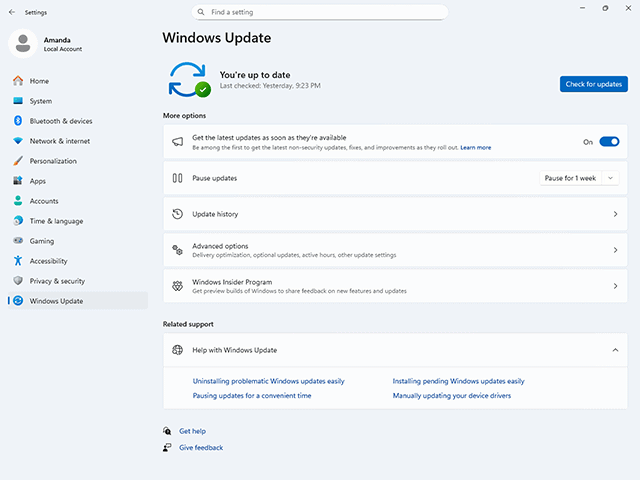
This takes about 10 minutes per computer:
-
- On Windows 11, open Settings and click Windows Update. On Windows 10, go to Settings, then Update & Security, then Windows Update.
-
- If you see “Restart required” or “Restart now,” save your work and restart. Updates often download on their own but don’t take effect until the computer restarts, and plenty of computers go weeks without one.
-
- Click “Check for updates” and install anything that shows up.
-
- Open Outlook or Word, go to File, then Office Account (or just Account), then Update Options, and click Update Now.
-
- Repeat on every computer used for email, banking or payroll.
If an IT provider manages your computers, they should be handling this already. It’s still fair to ask them one question: “Did this month’s Microsoft updates install on all our computers, and were they restarted?” A clear yes, with a date, is a good answer.
Not sure where you stand?
If you don’t know whether your computers are up to date, or you have an older server you’re worried about, call us at (360) 545-4033. We’re happy to take a look.